Good Software Starts With Understanding User Pain
In this article
Good Software Starts With Understanding User Pain
Some time back, I was helping submit engineering admission forms for my friend’s son.
We had to apply on multiple college platforms.
The form filling was not very difficult. Name, details, marks, documents — normal process.
But one thing kept repeating again and again.
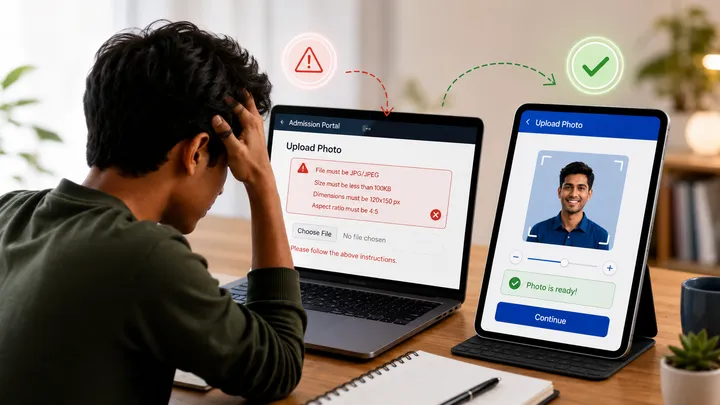
- Photo upload.
- Specific file size.
- Specific ratio.
- Specific pixel dimensions.
- Specific format.
If the photo did not match, the platform simply refused it.
Now, I am a developer. So for me, this was manageable. I resized the image, compressed it, adjusted the ratio and uploaded it.
In half an hour, we completed multiple applications.
But one thought stayed with me.
- What about a non-technical student?
- What about parents from a small town?
- What about someone who does not understand pixels, compression, aspect ratio or file format?
For them, this is not a small issue.
This becomes stress.
The User Does Not Think Like a Developer
As developers, we often understand the logic behind restrictions.
We know why file size is limited.
We know why photo ratio is required.
We know why a document format is needed.
But the user does not care about our technical logic.
The user only wants to complete the task.
And this is where many software systems fail.
They are technically correct, but practically painful.
- A form may be working.
- Validation may be working.
- Database may be saving properly.
But if the user feels helpless while using it, something is still wrong.
Validation Is Not User Experience
Many platforms simply throw an error:
“File size must be less than 100 KB.”
Technically, this is correct.
But for a normal user, this is not guidance.
It is only rejection.
A better system would say:
“Your photo is too large. We can compress it for you.”
Or even better:
Allow the user to upload the photo, crop it with preview, resize it automatically and continue.
This is not advanced AI.
This is not rocket science.
This is basic empathy in software design.
The platform already knows the requirement. So why should the user struggle outside the platform?
If the system can solve the problem, it should not transfer the pain to the user.
Software Should Think on Behalf of the User
This is one of the most important principles I believe in.
Good software should not only collect data.
- It should reduce confusion.
- It should guide the user.
- It should prevent mistakes.
- It should make difficult steps simple.
- It should think one step ahead.
For example:
- If the system needs a photo in a specific size, it should help create that size.
- If the system needs a document in PDF format, it should clearly guide the user.
- If a field has an error, the message should explain the problem in simple language.
- If five steps can become two steps, the software should reduce them.
- If the user is likely to get stuck, the system should support before frustration begins.
This is where technology becomes meaningful.
User Experience Is Not Decoration
Many people think user experience means beautiful screens.
- Good colours.
- Nice buttons.
- Modern layout.
All these things matter, but they are not the full meaning of user experience.
Real user experience is deeper.
It is about how easily a person can complete the work without confusion.
A beautiful form can still be painful.
A simple form can still be excellent.
The goal is not to impress the user.
The goal is to help the user finish the task with confidence.
The Distance Between Builder and User
In many projects, software is built like this:
- The client gives requirements.
- The manager prepares scope.
- The developer writes code.
- The tester checks cases.
- The system goes live.
But sometimes nobody deeply observes the actual user.
- Who is filling the form?
- What device are they using?
- Are they technical?
- Are they under pressure?
- Do they understand English?
- Will they know what to do after an error?
- Will they have someone to help?
These questions may look small, but they decide whether software feels simple or painful.
Especially in India, users come from different backgrounds, languages, devices and confidence levels.
A system that works only for technical users is not truly user-friendly.
A Simple User Pain Checklist
Before building any software screen, we should ask:
- Can a non-technical person understand this step?
- Can this task be automated?
- Can this error message be written in simpler language?
- Can we reduce the number of fields?
- Can we show preview before final submission?
- Can we prevent the mistake before it happens?
- Can the system guide the user instead of only rejecting the user?
These questions do not increase complexity.
Actually, they reduce future support calls, user frustration and repeated mistakes.
Simplicity Is a Serious Responsibility
Software is powerful because it can multiply clarity.
But it can also multiply confusion.
One small poor design decision can create stress for thousands of users.
One thoughtful improvement can save time for thousands of people.
That is why I feel software development is not only technical work. It is responsibility.
When we build software, we are deciding how someone will experience a process.
- Will they feel guided?
- Or will they feel stuck?
- Will they complete work confidently?
- Or will they keep asking someone for help?
Good software starts where user pain is understood.
Not after coding. Before coding.
Because technology should simplify life, not test the patience of the user.
If this made you think about your own business software, share your thoughts. Where do your users or team members get stuck most — forms, approvals, uploads, reports, follow-ups, or confusing error messages?

Chirag Gadara
System Thinker & Technopreneur
With over 18 years of experience across technology, automation, and enterprise systems, I help businesses eliminate bottlenecks and engineer simplicity for sustainable growth.